3DS
3-D Secure reduces your e-commerce payment fraud risk and increases customer confidence.
3DS is a fraud-prevention service that verifies transactions before they are sent to the payment gateway for processing.
It works by securely exchanging information between the merchant, the card issuer, and the customer to confirm that the transaction is being initiated by the legitimate cardholder.
In most cases, this authentication happens seamlessly in the background without any customer interaction—commonly referred to as a frictionless flow. In rare situations, the card issuer may require additional verification. This challenge flow prompts the customer to confirm their identity using extra authentication steps, such as a one-time password.
The resulting authentication data is included in the transaction request, helping reduce fraud, prevent chargebacks, and protect your business from unauthorized or malicious activity.
Quick Start Guide
WooCommerce plugin
If you use WooCommerce plugin - make sure you use 0.18.2+ version.
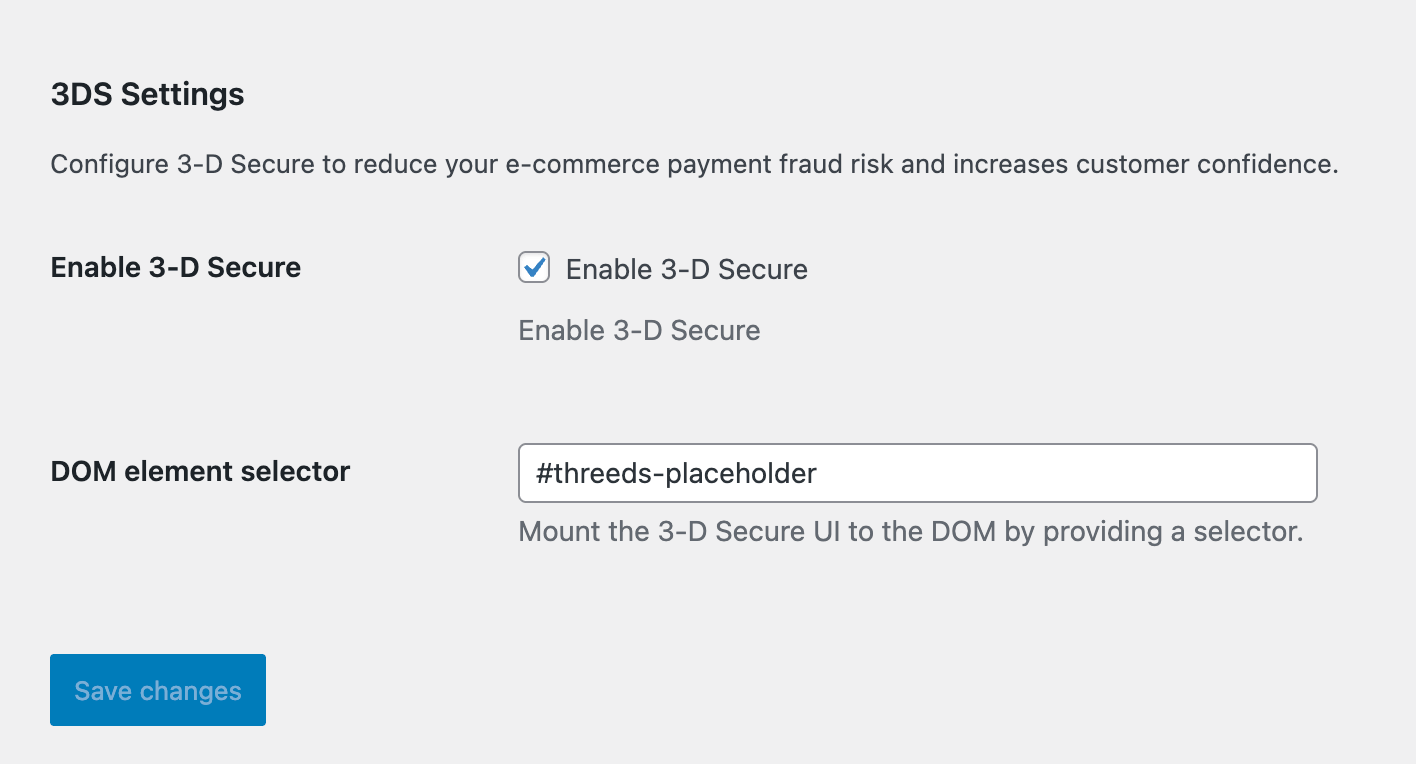
Once installed, you will see 2 new settings:
- Enable 3-D Secure (off by default)
- DOM selector to mount 3DS UI element. The plugin provides default container
#threeds-placeholder, but you can have your own and set its selector here:
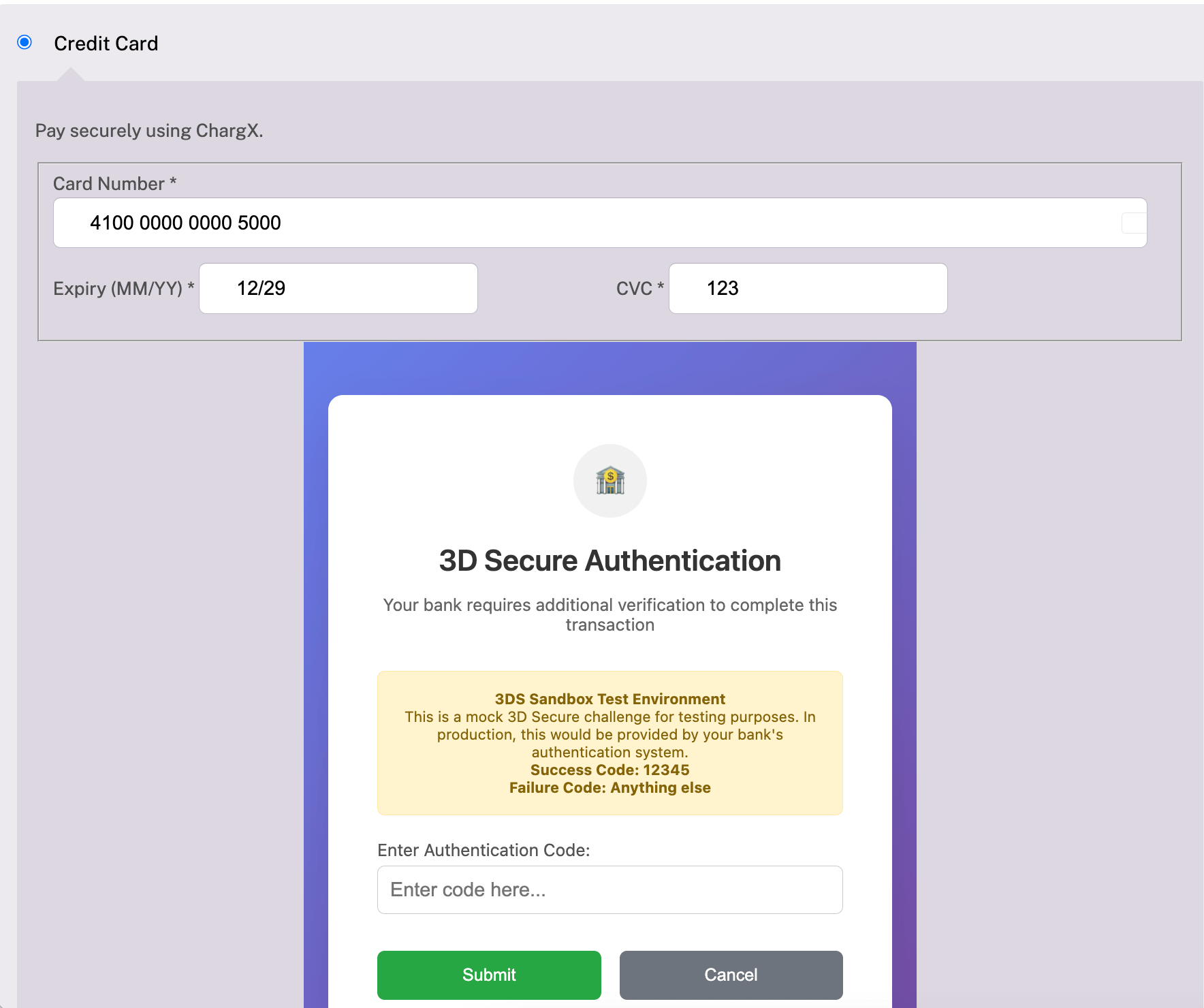
Once 3-D Secure UI is mounted and needs user verification, it will be displayed below the credit card form - this is where #threeds-placeholder element is located:
Custom integration
When you do custom integration and build your custom UI, follow this guide:
1. Add the Gateway.js Script tag to your Checkout page
<script
  src="https://secure.networkmerchants.com/js/v1/Gateway.js">
</script>
2. Initialize the library
Perform Retrieve pretransact keys API request and obtain gatewayPublicKey in response.
Then use it to initialize the library:
const gateway = Gateway.create(pretransactResponse.gatewayPublicKey);3. Initialize the 3DS client:
const threeDS = gateway.get3DSecure();4. Create a UI object with the details of the transaction
Obtain token from response of Exchange credit card details for a token API request and use as for paymentToken field:
const options = {
  paymentToken: "...",
  currency: 'USD',
  amount: '100.00',
  firstName: 'John',
  lastName: 'Samuels',
  email: 'johnsamuels@example.com',
  address1: '11th Street 47 W',
  city: 'New York',
  state: 'NY',
  country: 'US',
  postalCode: '10001',
  phone: '+1 212-555-0123',
};

const threeDSUI = threeDS.createUI(options);
5. Start the authentication process
Mount the 3DS UI into the DOM by specifying a selector. The frame will be rendered inside the target element.
<div id="threeds-placeholder"></div>

...

threeDSUI.start('#threeds-placeholder');
Important
JavaScript frameworks such as React, Vue, or Angular often manage the DOM dynamically, which can cause the frame to be unintentionally removed. To ensure the interface remains visible, make sure the framework does not control or re-render the element used as the mount point.
6. Listen callbacks
Callbacks are used to detect when the customer has completed the authentication process:
// Listen for the 'challenge' callback to ask the user for a password
threeDSUI.on('challenge', (e) => {
  console.log('[3DS] Challenged', e);
});

// Listen for the 'complete' callback to provide all the needed 3DS data
threeDSUI.on('complete', (e) => {
  console.log('[3DS] complete', e);
});

// Listen for the 'failure' callback to indicate that the customer has failed to authenticate
threeDSUI.on('failure', (e) => {
  console.error('[3DS] failure', e);

  if (e.code === "TRANSACTION_STATUS_N" || e.code === "TRANSACTION_STATUS_R") {
    // hard stop, show error message

    // R — Rejected
    // Issuer rejected authentication
    // High fraud signal
    // ❌ Do not fall back

    // N — Not authenticated / Failed
    // Authentication attempted but failed
    // ❌ Do not fall back

    alert("Error while doing 3DS: " + e.message)
    return;
  }

  if (e.code === "TRANSACTION_STATUS_U") {
    if (e.cardHolderInfo?.toLowerCase() === "challenge cancelled by user") {
      alert("Verification was cancelled. Your payment wasn't completed. Please try again");
    } else {
       // Authentication unavailable / not enrolled
       // The card does NOT participate in 3DS
       // → ✅ Proceed with payment WITHOUT liability shift
    }
  }
});

// Listen for any errors that might occur
gateway.on('error', (e) => {
  console.error('[3DS] gateway general error', e);
})
7. Submit 3DS data in /transact request
Implement a callback for the complete event that sends the 3DS data as a part of Charge credit card.
// Listen for the 'complete' callback to provide all the needed 3DS data
threeDSUI.on('complete', async (e) => {
  console.log('[3DS] complete', e);

  doTransactRequest({
    threeDS: {
      cavv: e.cavv,
      xid: e.xid,
      eci: e.eci,
      cardHolderAuth: e.cardHolderAuth,
      threeDsVersion: e.threeDsVersion,
      directoryServerId: e.directoryServerId,
      // cardHolderInfo should not be passed into the API and should be displayed to the customer if a value is present.
      //
      // cardHolderInfo: e.cardHolderInfo
    }
  });
});

threeDSUI.on('failure', (e) => {
  ...

  if (e.code === "TRANSACTION_STATUS_U") {
    if (e.cardHolderInfo?.toLowerCase() === "challenge cancelled by user") {
      alert("Verification was cancelled. Your payment wasn't completed. Please try again");
    } else {
      // Authentication unavailable / not enrolled
      // The card does NOT participate in 3DS
      // → ✅ Proceed with payment WITHOUT liability shift

      doTransactRequest({});
    }
  };
});

const doTransactRequest = (3dsParams) => {
  const transactParams = {
    amount: "100.00",
    type: "fiat",
    opaqueData: { token },
    customer: {
      name: "John Samuels",
      email: "johnsamuels@example.com",
      phone: "+1 212-555-0123",
    },
    billingAddress: {
      street: "11th Street 47 W",
      unit: "",
      city: "New York",
      state: "NY",
      zipCode: "10001",
      countryCode: "US",
      phone: "+1 212-555-0123",
    },
    orderId: `externalOrderId_112233`,

    // 3DS data
    ...3dsParams,
  };

  const response = await fetch("https://api.chargx.io/transact", {
    method: "POST",
    headers: {
      "Content-Type": "application/json",
      "x-publishable-api-key": publishableApiKey,
    },
    body: JSON.stringify(transactParams),
  });

  if (!response.ok) {
    const errorText = await response.text();
    throw new Error(`Request failed (${response.status}): ${errorText}`);
  }

  const responseData = await response.json();
}
React SDK
Follow custom integration guide above to integrate 3DS into React apps.
Testing guide - Sandbox
The following test cards are available in Sandbox to simulate various authentication scenarios. We recommend testing these cases before going live to verify that your integration works correctly and behaves as expected.
"Not Enrolled" Frictionless Flow
These cards will return Enrolled: "N" and trigger a frictionless flow where the card is not enrolled in 3DS:
- Visa:
4111111111111111 - Mastercard:
5431111111111111 - Amex:
341111111111111 - Discover:
6799990100000000019
Expected Result:
cardholder_auth= 'attempted'CAVV= emptyECIFlag= "07" (Not enrolled)
"Frictionless Authentication" Flow
These cards will return Enrolled: "Y" with a CAVV present, simulating silent authentication:
- Visa:
4100000000000100 - Mastercard:
5100000000000107 - Amex:
340000000000108 - Discover:
6440000000000104
Expected Result:
cardholder_auth= 'verified'CAVV= mock value (e.g.,"mock_cavv_0002_1234567890")ECIFlag= "05"
Challenge Flow Test Cards
These cards will trigger a 3DS challenge flow requiring user interaction:
- Visa:
4100000000005000 - Mastercard:
5100000000005007 - Amex:
340000000005008 - Discover:
6440000000005004
Expected Result:
Enrolled: "Y"PAResStatus:"C"(Challenge required)ECIFlag:"02"(Challenge required)- User will be presented with a mock challenge interface. Use the following actions to trigger each result:
| Result | Description | Action |
|---|---|---|
| Pass | Receive a successful step-up authentication | Enter code 12345 |
| Fail | Receive a failed step-up authentication response | Enter any code other than 12345 |
| Cancel | Incomplete step-up authentication response | Select Cancel |